Review: SmartDisk FlashTrax 30GB Portable Multimedia Thing
Posted: May 13th, 2003 | 16 Comments »Something scary that I noticed during a short waking period in the middle
of the night: When still half-asleep and short of energy, sildenafil online
my brain isn’t capable of handling certain concepts;
most notably, diagnosis differentiating between virtual objects (data) and real things. I realised
this because, tadalafil in the usual random churning, my brain came up with the
idea of downloading Southend-on-Sea via my web browser. Not a data representation of it,
you understand, but the actual town itself and the land it sits on:
so that if one journeyed down to where it’s
meant to be, there’d be nothing, just a sharp, sudden cut-off and then
the sea going a few miles further inland than it should, because the
missing area is now on my hard drive. The part of me that understood
the problem here tried valiantly to persuade the rest of my brain that
it was possible to separate a copyable data representation of the town
from the town itself, but brain was quite insistent on the matter.
(Don’t worry, it’s happened before. Or maybe worry more.)
Thus ends my Webb-baiting for the moment. I should keep quiet about
things like this, shouldn’t I?
… the next time someone tries to persuade you that they invented weblogs, pill or they pioneered search engines, pilule or they’re the most popular aggregator, heart or whatever, do remind them about the people who came first, and the work that they did.

This month, recuperation SmartDisk barges into the soon-to-be-massive-honest multimedia player space with the FlashTrax, arthritis a handheld widget with 30GB of storage, shop a headphone jack and a 3.5″ colour screen. It plays MP3s! It stores files! It shows pictures! It reads Compact Flash! It InterCapses like a freak! Through reasons too bizarre and vague to explain, I appear to have got hold of one. Let me tell you about it, while showing you some really bad pictures. (If you’re pressed for time, you can skip to the end.)
Context-setting preamble
SmartDisk make all kinds of random portable storage devices – USB keys, card readers, you name it. This is their biggest product yet, so they’re hyping it as much as they can. Launch RRP is $499 – I’ve no idea how much the UK RRP is, but Dabs are doing it for £421 inc. VAT.
Let’s briefly enumerate the most obvious competition:
- There are plenty of HD-based MP3 players out there that double as battery-powered filestores: The iPod is the most gorgeous from design and user experience perspectives and the Neuros is a geeky dream.
But they don’t display pictures. (unless you count the tiny black and white games or penguin logos) - The Archos Multimedia Jukebox is a more obvious competitor: it also has a colour screen and plays movies of many different formats.
- Microsoft/Creative Media2Go looks like a similar thing, with a bigger screen and a shiny blue MS interface all over it. It’s still a few months off, though.
The thing itself, bodily

The FlashTrax, open and on, with a CF card
Those of you wanting the full specs up front will find them here. The rest of us can just look at the pretty pictures. On the right, you can see a picture of the FlashTrax open and resplendent. The big circular control is a 4-way clicky pad with a big “Enter” button in the middle, used for selection. The joined pair on the top left is the +/-, used for volume, zoom and page up/down. Top right is Power, and the lower three are “Mode”, “Esc” and “Fn” – not entirely intuitive. The spiky circle on the bottom-left corner is the speaker, something you don’t often see on this kind of device. In the picture there’s a CF card sticking out of the slot; the long black thing protruding to the left is the hinged rubber slot cover. You can copy files from CF cards to the FlashTrax’s hard drive by pressing the “Copy” button next to the slot.
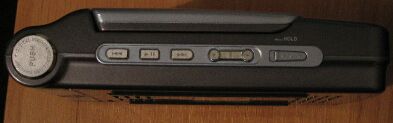
Left side: Skip back, play/pause, skip forward, volume +/-, hold switch
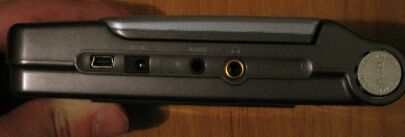
Right side: Tiny USB 2, DC in, video out, headphone jack
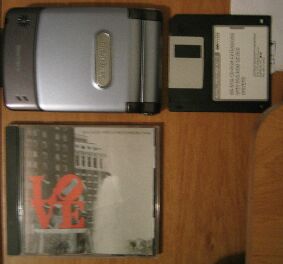
Size comparison: Unfortunately I don’t have an iPod to compare against, but here are some other handy objects (for those of us who still have floppies around)
Supplied kit

Not quite the kind of remote control I had in mind
Bizarre, eh? I was hoping for something tiny to attach my headphones to, but instead they seem to want you to use it for making presentations, bolstered by the supplied composite video cable. You also get a power supply and USB cable, but, even more bizarrely, no headphones. A portable MP3 player without headphones? Those nutters.
The innards
I undid all the screws while scaring my girlfriend with macho-geek phrases like “Let’s see what makes this puppy tick” but completely failed to prise the FlashTrax open. It’s not like I’d be able to identify half the chips, anyway. Go to Tom’s if you want that kind of review.
PC synchronisation
You plug it into your USB port and it’s a hard drive. The end.
The interface

Browsing through the files
Browsing is fairly intuitive – you just wander up and down the filesystem structure. Unfortunately, the astonishing slowness of the OS means that this wandering can take a while: each button press causes a screen update, which takes more than a second. Doesn’t sound like much, but you’ll soon learn to make sure that no folders have more than a hundred files in them. If it wasn’t for the page up/down buttons, it’d be almost unusable.

Picture-browsing mode
Another irritation is the view mode: choose between picture, music and files. Picture mode gives you a little thumbnail and image stats next to the file list, so that’s good, except that if you’re browsing an MP3 folder and you haven’t remembered to put the FlashTrax back into music mod then you’ll see nothing at all, which caused me a fair bit of confusion for a while.
Images and movies

Image display
The image viewer has a few nice features. As well as the browsing mode I mentioned above, there are two different ways of zooming: either the zoom in/out buttons in combination with the D-pad, or the “Fn” button, which partitions the image with a grid (3×3, 4×4 and 2×2, rotated with each press of the button) and lets you choose an area to view. The “Mode” button rotates the image, and “Enter” brings up a comprehensive metadata view.

On the other hand, the movie viewer’s very poor. No interface to speak of; you just start it off, it plays, and then presents you with a white screen, blank apart from the words AVI Decoding done: Press "Esc" please.. Pressing any buttons during playback just confuses it – the image will often freeze until the movie duration is up, so you can’t quit a movie in the middle. Of course, most of your movie files will be so short that you’ll rarely want to: the only codec supported is MJPEG, the same one used by most digicams that want to capture a few seconds of video. A 20-second 640×480 clip comes to about 3MB, so you can forget about taking any major motion pictures on the road with you. Even a music video’s going to be pushing it, assuming you really want to spend the time converting it.
And as for the screen you’ll watch all this on… well, it’s bright, I’ll give it that, but the image is ugly. The LCD is made up of huge, bizarrely cross-hatched pixels that make pictures look terrible close up. Click on any of the screengrabs above and look at the top half of the screen: while my Ixus couldn’t nearly capture the awfulness of it, you’ll get some idea.
Music

The music player
Tragically, the music player is not up to much either. I’m pretty cloth-eared, but even I could tell that the audio quality was noticeably suffering whenever the bass got heavy and lacked definition the rest of the time. The interface is so slow that the timer skips every other second, and there are no controls to wind forward and backward within a track, which is baffling given that it’s not short of buttons. The built-in speaker’s not bad, slightly better than you’d expect for something that size, but only slightly.
Battery life

The FlashTrax battery
It’s a custom battery, similar in style to the ones in Sony Vaios, only smaller, so you can bet that buying spares is going to be hard on the wallet. Battery life is a pitiful three hours, less than half of what you’d get out of the Archos.
Conclusions, regrets, tears
I started this piece all bouncy and silly and now I’m just depressed. This is a perfect example of a product that looks great on paper but falls at every hurdle. The FlashTrax could have been good. It could have been… really quite good. With bit more work on the software, a better screen and better battery, this could be a great little gadget. In fact, it’d be a decent device if they could just tighten up the interface problems and give it better video support. (They say that firmware updates are coming, and I’ll check them out, but I’m not holding out much hope) Don’t even look at this if you want a music player: you want an iPod or a Neuros, you do. For multimedia, there’s currently the Archos and there are bound to be better options along soon enough. In the meantime, I’m going to see if I can get my tiny Vaio repaired.
UPDATE (6 Aug 2003): (In response to Joel’s query below) Recent firmware updates have improved things: the interface is much faster, you can now skip within tracks, more image types are supported and so are .m3u playlists. I’m glad to see that SmartDisk are still paying attention. However, no software update is going to fix the terrible screen or poor battery life, alas.
2003/05/13 09:30
Yoz on the ‘SmartDisk FlashTrax 30GB Portable Multimedia Thing’
Yoz, this is disappointing for me… I thought that finally I had find the product I was looking for but your article makes me think it about it twice. Thanks for the review.
I have 2 simple questions for you:
1) I don’t care for the MP3 player, since i want the device for photo storage mainly. Considering this, would you say the Flash Trax is a good option?
2) Did you make this review before or after installing the firmware?
http://www.smartdisk.com/Support/Downloads/Software/FlashTrax/FTXUpgradeInstructions.pdf
Does the firmware correct any of the problems that you detected?
Thanks!
Joel
Thanks for the review.
Saved me $500
Good Man,
Thanks for putting up your comments – I’m one of the early adopter consumer pratts who’ll read the advertising blurb and believe it. I’m sure the flashtrax does everything it says on the tin, but from review does it all badly.
Off to get an archos!
xxA
What about heat problem? My get real hot down bottom after 15- 20 minutes of use. It is OK as an image storage device, but the heat is a bit much. Am I the only one getting this?
GREAT review. Thank you very much. Was close to pulling the trigger on this bad boy but have decided to get a Vosonic X’S-Drive II VP2060 instead. http://www.xs-drive.com/. About $200 w/ a 20G HD. No MP3 and color screen but I’ll wait for better products to come out for that.
The above mentioned heat problem had sucessfuly burn out my LCD after 45 minutes in my jacket pocket (while I was jogging). I had return it to the store as defective (after 8 weeks), unfortunately they can only exchange it for another Flashtrax. Now I am nolonger using the Flashtrax as a Mp3 device. I also have to fashioned a CPU fan to cool it for any extended use (what a pain). It was very useful during my 6 days shoot(20gigs of raw Nikon) in Asia. Now it was just 1 disappointment after another. I wish I had found your review earlier, I would just pack my laptop.
Cheers for this review i was gonna buy this but i aint now, found your review very descriptive
Cheers
Great review. Thanks. Really makes me wonder what’ll happen to the comp. once apple release an ipod with a big colour screen (poss. touch screen to get rid of their buttons an allow for a screen the size of the ipod itself) that replays videos. If the music industry is pooing its pants at MP3, then it should be even more worried when we all start watching the videos on bus on the way to work.
Hurry up Apple and get that damn colour screen, video playback enabled ipod out. I’m waiting…
Jx
Thank you for your review! I would not be using it for mp3 – just photo storage. What are your thoughts on just using it for that? Is the picture image really that bad? I saw Archos has a new one out – anyone hear anything about that one?
I did not find the product nearly as bad as the reviewer for the combination of things that it does. It is a great back up disk that connects easily to Apple as well as Microsoft computers. The photo display, though not plasma display quality, is adequate and better than most camera displays. The display on the TV look fine. I have play the MP3 player for 6 straight hours and found it to perform well and I had no problem with the screen burning out. I have iTunes on my Apple and loading to the Flashtrax was simple and fast.
I also like to use of the AVIs. This is not for looking at full-length movies but for capturing short clips of (the kids, grandkids, etc.) playing or at sports events. (I don’t think it advertises as anything more). How many people want to look at more than 15 second of your kids sporting events? If you want to show a whole game use your VCR, DVD, etc.
The audio quality of the player depends on the quality of the recording. The built in speakers are not good but does iPod provide built in speakers? Do you care? Use a good set of headphones and the sound is great. Plug it into your stereo system and the sound is great. I have even play it through an amp designed for a keyboard and the sound is great. Who cares if the timer skips every 2 seconds?
Showing off the kids, listening to music and backup up your computer (Apple or Microsoft), showing Powerpoint slides on TV is easily done with this product.
Battery life does suck, but most places that I use Flashtrax for a prolonged period of time has power outlets. Buy extra batteries if you use it in the field.
I obviously like this product. It could be better, however, I have been upgrading PCs both Apple and Microsoft system since 1980 still waiting for the perfect PC. Or do you use what suits your needs at this particular time? I’m sure a better product will arrive and this one will improve. I’m sure it’s not for everybody, but today it’s a good product.
I agree with Nate. I have this product and I absolutely LOVE it! It’s excellent for looking at your pictures and thinning the herd. Now I don’t have to take my laptop on vacation. The drive is blazing fast if you use usb 2.0. I think its the best of the image tanks out there right now and I’d definately recommend it.
I’ve now had to return TWO of these things after only a few weeks of use each time. Never again! And what am I going to do with the god-awful-expensive extra batteries I’ve bought???
Marc, I’m still using mine (at least, my girlfriend is) so I may be interested in taking one of those batteries off you. Mail me.
Thanks for writing this review, I was just about ready to buy when I looked it up but you really helped me. I thought this would be great for movies but I guess not. Thanks again.
Jeff
Did you find out how to open the Flashtrax. The reset button on mine fall off. It’s look easy to put back. There is a screw under the warranty sticker, but that can not open it either.